 Unlimited Watchlists
TradingView watchlist limit: what the free plan allows, and a free workaround
Updated July 17, 2026
If you chart on TradingView's free plan, you'll hit the wall quickly: you can only keep one watchlist, with a cap on how many symbols it can hold. Paid plans raise the number of lists and symbols step by step, but truly unlimited watchlists are reserved for the most expensive tiers. The exact caps have changed over the years, so check TradingView's pricing page for the current numbers — the structure, though, has stayed the same: more watchlists cost more money.
Why one watchlist isn't enough
A single list works until your process grows past it. Most active traders end up wanting a list per strategy (breakouts, pullbacks, 52-week highs), per sector, per timeframe, or per screener run — and if you scan Indian markets with Chartink, every scan is naturally its own list. Cramming all of that into one watchlist means scrolling, mislabeling, and losing track of why a symbol was ever added.
Your options compared
| Option | Cost | Trade-off |
|---|---|---|
| Upgrade TradingView | Monthly subscription | Simplest path and it supports the platform — but you're paying mainly for list slots if charting features aren't what you need. |
| Track lists in a spreadsheet | Free | No chart link. You end up typing every symbol into TradingView by hand anyway. |
| Browser-extension side panel | Free | Watchlists live in your browser next to TradingView, not inside your TradingView account — so they don't sync to the TradingView mobile app. |
The side-panel workaround
Unlimited Watchlists for TradingView is a free Chrome extension that keeps any number of watchlists in Chrome's side panel. Click a symbol and it opens or switches that chart on tradingview.com — press Space to cycle through the whole list. Because the lists live in the extension rather than your TradingView account, the plan limit simply never applies, and it works the same on TradingView's free plan as on paid ones.
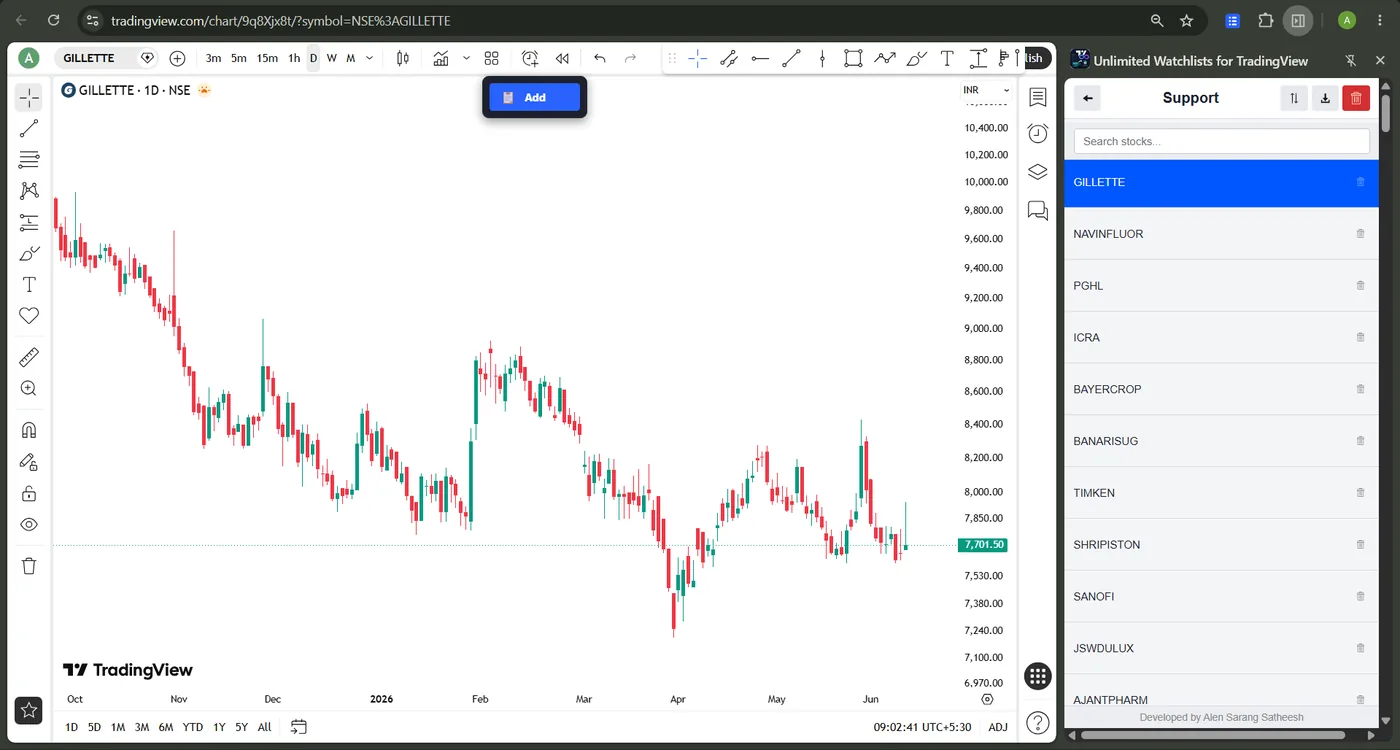
Populating lists is the fast part:
- From Chartink — one click imports a whole screener's results as a named list. Full guide here.
- From a CSV file — bulk-import symbols exported from a broker or screener. Full guide here.
- From any TradingView page — a floating "Add to Watchlist" button saves the current symbol to any list.
Privacy note: everything is stored locally in your browser. No account, no analytics, no data leaves your device — see the privacy policy.
Frequently asked questions
Does the extension change my TradingView account?
No. It doesn't touch your TradingView watchlists at all — it keeps its own lists in the browser and simply opens TradingView chart pages when you click a symbol. Your account, plan, and data on TradingView stay exactly as they are.
Does it work with the free TradingView plan?
Yes. It opens standard chart pages, which work on every TradingView plan — that's the whole point: the free plan limits your watchlists, the side panel doesn't.
Is this against TradingView's rules?
The extension doesn't modify TradingView, bypass any paywalled charting feature, or automate your account. It's a bookmark manager for charts, organized as watchlists, that opens normal TradingView URLs — the same as clicking links from a spreadsheet, just faster.
Keep every watchlist. Pay nothing.
Free, private, works with TradingView's free plan.
Add to Chrome — Free